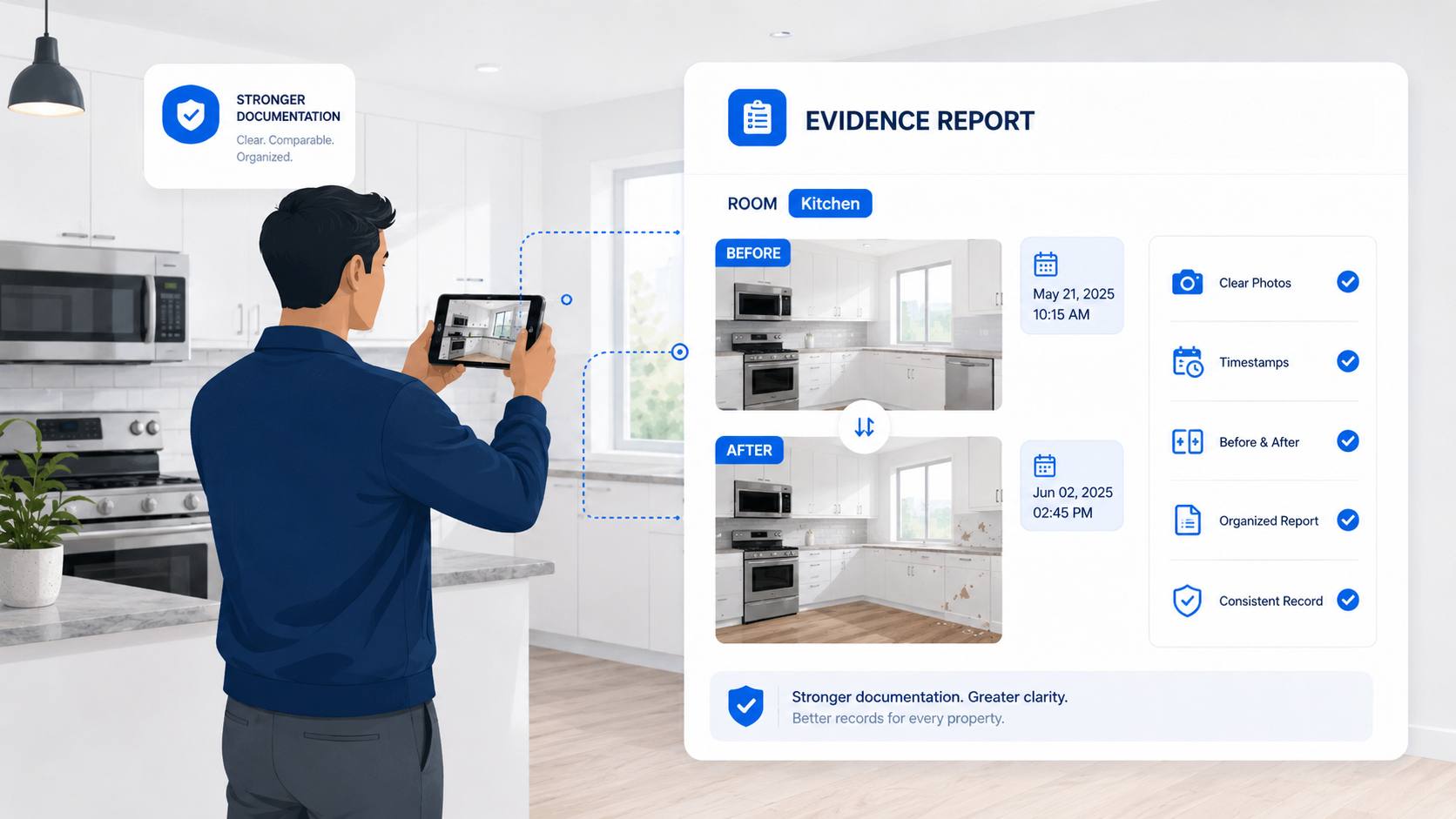
Strong rental damage documentation is not about taking random photos after something goes wrong. It is about creating a clear, organized record before and after the tenant moves out.
Rental damage documentation is only useful when people can understand it later.
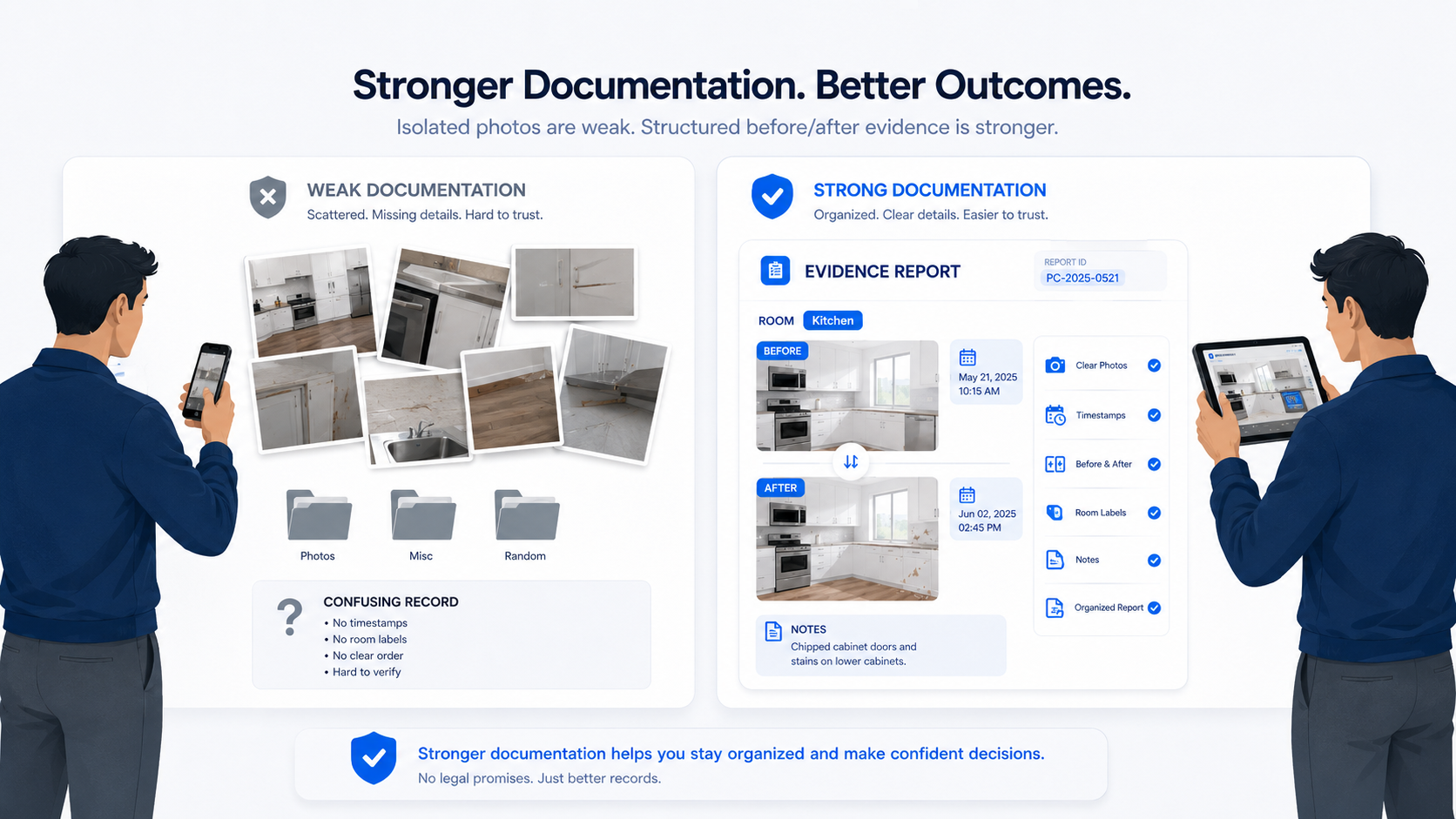
A folder full of random photos may feel like proof in the moment, but weeks or months later it can become confusing. What room was this? When was it taken? Was this before or after the tenant moved in? Is the mark new, or was it already there? Is there another photo from the same angle?
That confusion is where disputes begin.
Strong documentation does not depend on memory. It creates a clear record that can be reviewed, compared, and shared.
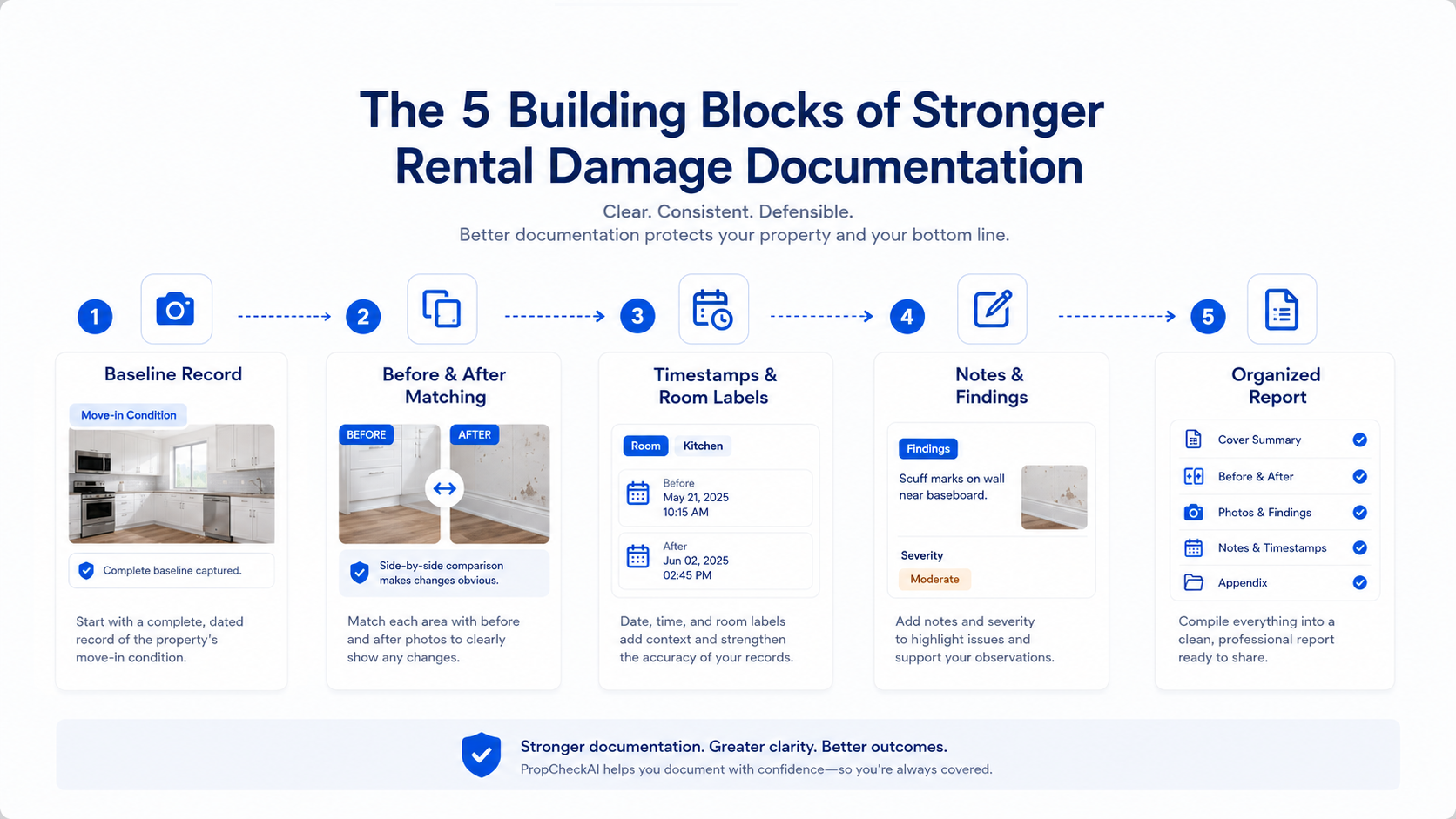
PropCheckAI is built around this idea: Baseline record → before-and-after comparison → timestamps and room labels → notes and findings → organized report
The goal is simple: make rental condition easier to document, easier to compare, and easier to review.
Strong documentation starts before there is a problem
Many landlords only think about documentation after damage is discovered. That is too late.
A photo of damage at move-out may show that something exists, but it does not always show when it happened or whether it was already there before the tenant moved in.
That is why the move-in baseline matters. The baseline is the original condition record. It shows what the property looked like before the tenant began using it. Without that baseline, the move-out record is missing its comparison point.
A strong baseline should show:
the room condition before occupancy
major surfaces such as walls, floors, doors, and windows
appliances, fixtures, cabinets, and counters
included furniture or accessories
existing marks, wear, or damage
room labels and capture dates
enough visual context to compare later
A move-out photo is much stronger when it can be compared to a move-in record.
The question is not only:
“Is there damage?”
The better question is:
“What changed?”
move-in baseline is the easiest place to start when you want the comparison to work later.
Random photos are weaker than comparable records
A random photo can show part of the story. A comparable record shows the story more clearly.
For example, imagine a wall scuff near a bedroom door. A move-out photo shows the scuff. But if the move-in photo was taken from a different wall, at a different distance, with different lighting, it may be hard to compare.
That does not mean the photo is useless. It means the record is weaker than it could be.
Strong documentation is easier to review because it is structured. The room is labeled. The date is clear. The before image and after image are connected. Notes explain what the reviewer is seeing.
That structure reduces ambiguity.
The five building blocks of stronger documentation
Strong rental documentation usually has five building blocks:
1. Baseline record — The baseline record is the foundation. It is the move-in condition record that answers what the room looked like at move-in, what items were already there, and what future inspections should compare against.
2. Before-and-after matching — Before-and-after matching turns photos into comparison. Matching room order, capture points, and camera direction makes changes easier to see and reduces confusion caused by different angles or missing context.
3. Timestamps and room labels — A stronger record includes when the image was captured, which room it belongs to, and what inspection type it came from. That context makes the documentation easier to review and easier to turn into a report.
4. Notes and findings — Photos are important, but notes add context. Short, specific notes tied to a room or image make the final report easier to understand without exaggeration or guesswork.
5. Organized report — The report is where the inspection record becomes usable. A good report should be organized room by room, with before-and-after images, marked findings, notes, page numbering, report IDs, and summary information.
The goal is not to create more work. The goal is to create a record that is easier to understand later.
1. Baseline record
The baseline record is the foundation. It is the move-in condition record that answers what the room looked like at move-in, what items were already there, and what future inspections should compare against.
2. Before-and-after matching
Before-and-after matching turns photos into comparison. Matching room order, capture points, and camera direction makes changes easier to see and reduces confusion caused by different angles or missing context.
3. Timestamps and room labels
A stronger record includes when the image was captured, which room it belongs to, and what inspection type it came from. That context makes the documentation easier to review and easier to turn into a report.
4. Notes and findings
Photos are important, but notes add context. Short, specific notes tied to a room or image make the final report easier to understand without exaggeration or guesswork.
5. Organized report
The report is where the inspection record becomes usable. A good report should be organized room by room, with before-and-after images, marked findings, notes, page numbering, report IDs, and summary information.
Why isolated move-out photos often cause problems
A move-out photo by itself may show damage, but it can still leave important questions unanswered.
Was the damage already present at move-in?
Is there a baseline photo from the same room?
Was the item included with the rental?
When was the move-out photo taken?
Which room does the image belong to?
Is the photo connected to a report?
Is there a note explaining the finding?
If the record cannot answer those questions, the issue becomes easier to dispute.
This is why stronger documentation focuses on comparison, not just capture. The goal is not simply to prove that a mark exists. The goal is to show the condition record clearly enough that the change can be reviewed.
Why scattered folders are hard to use later
Many landlords have inspection photos spread across phones, email threads, cloud folders, text messages, and old backups. That may work for a single property once. It does not scale.
When documentation is scattered, it becomes harder to find the right image at the right time. It also becomes harder to know which version of the record is complete.
Common problems include:
photos stored without room names
screenshots mixed with original images
move-in and move-out photos in different folders
duplicate images
missing timestamps
notes stored separately from photos
reports created manually after the fact
A stronger workflow keeps the inspection record organized from the beginning. That is one of the reasons PropCheckAI is designed around properties, rooms, inspection modes, comparison, review, and report generation.
Manual review can be slow. A landlord may need to compare every move-in image against every move-out image. That becomes tiring, especially when the property has many rooms or when multiple inspections are happening close together.
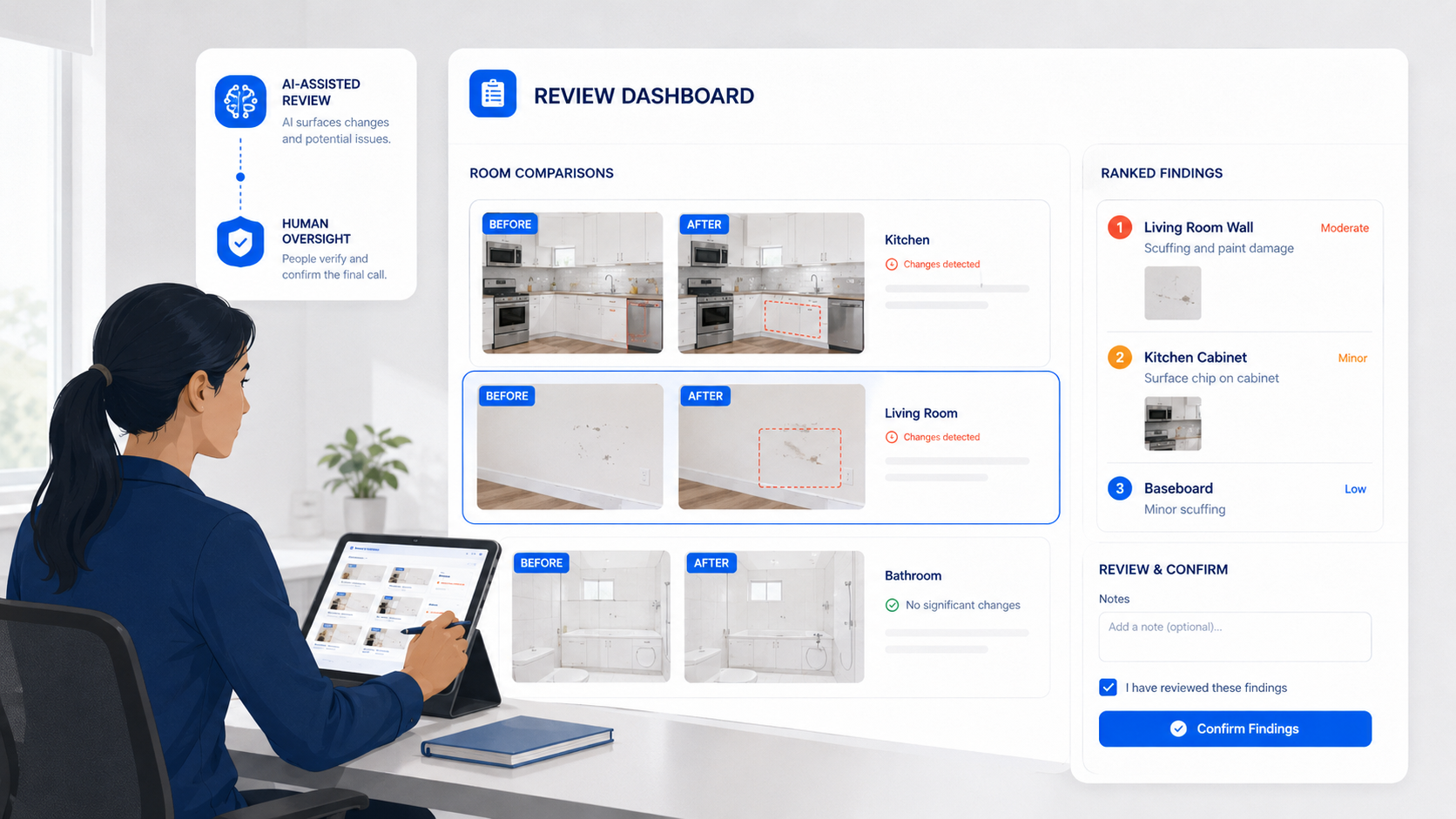
AI-assisted comparison can help by surfacing visual changes and helping users focus on the areas that may need attention.
PropCheckAI can help with review by supporting workflows such as:
before-and-after comparison
room-based review
visual change detection
ranking areas by change activity
user confirmation of findings
report generation after review
The important point is this: AI helps review the record. It does not replace the user’s judgment.
Humans still make the final decision
A visual change does not always mean damage.
It could be normal wear. It could be different lighting. It could be a moved chair. It could be cleaning in progress. It could be an intentional repair. It could be a camera angle difference.
That is why human review is still required.
The user should decide:
whether the finding matters
whether it should be included in the report
whether a note is needed
whether the issue should be dismissed
whether more context is required
This is the right balance. AI can reduce review time. Humans make the final decision.
Strong documentation helps reduce ambiguity
The biggest value of stronger documentation is clarity.
A strong record helps people understand what the property looked like before, what it looked like after, what changed, where the change happened, when the record was created, what notes were added, and what was included in the final report.
This does not guarantee a specific outcome. It does not replace legal advice. It does not automatically prove responsibility.
But it can reduce ambiguity.
And in rental inspections, reducing ambiguity is valuable. Clearer records help landlords, renters, staff, and property managers have more practical conversations about property condition.
What stronger documentation looks like in practice
A stronger PropCheckAI-style documentation workflow looks like this:
Create the property.
Add the rooms.
Capture the move-in baseline.
Follow the same room order at checkout.
Capture comparable move-out images.
Review before-and-after changes.
Use AI-assisted comparison when needed.
Confirm or dismiss findings.
Add short notes.
Generate an organized report.
This workflow keeps the record connected from start to finish.
The move-in is connected to the move-out. The photos are connected to the room. The findings are connected to notes. The notes are connected to the report.
That connection is what makes the documentation stronger.
Final takeaway
Strong rental damage documentation is not about taking more random photos. It is about creating a clearer record.
Start with a baseline. Match the checkout to the original inspection. Use timestamps and room labels. Add short notes. Review changes carefully. Generate an organized report.
That is how rental condition becomes easier to compare. And that is the system PropCheckAI is built to support.
Important Disclaimer
PropCheckAI helps users create, organize, compare, and review rental inspection documentation. PropCheckAI does not provide legal advice, does not guarantee dispute outcomes, and does not make legal or financial decisions for users. Users remain responsible for reviewing inspection results and deciding how reports are used.
Ready to create clearer rental inspection records?