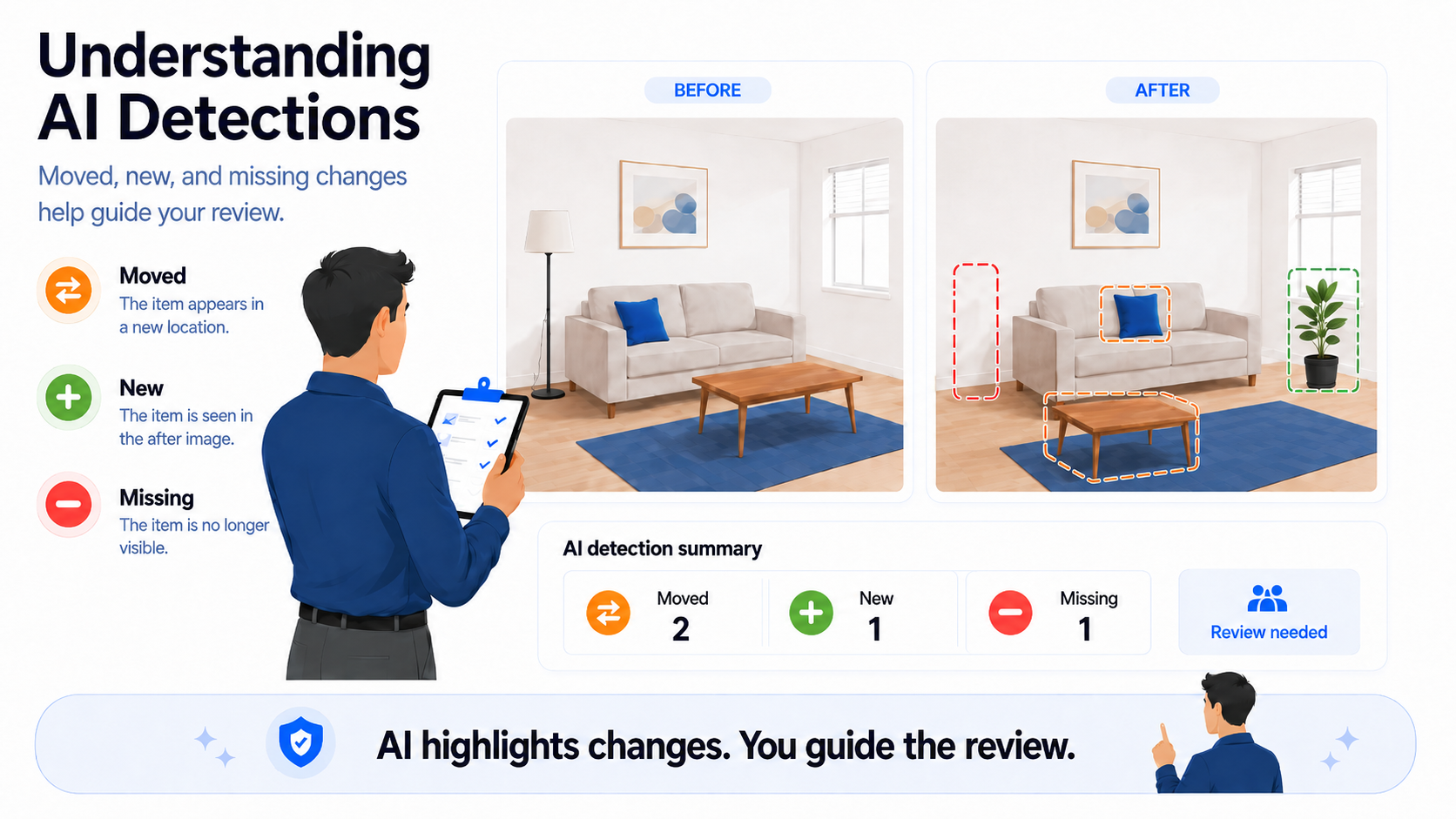
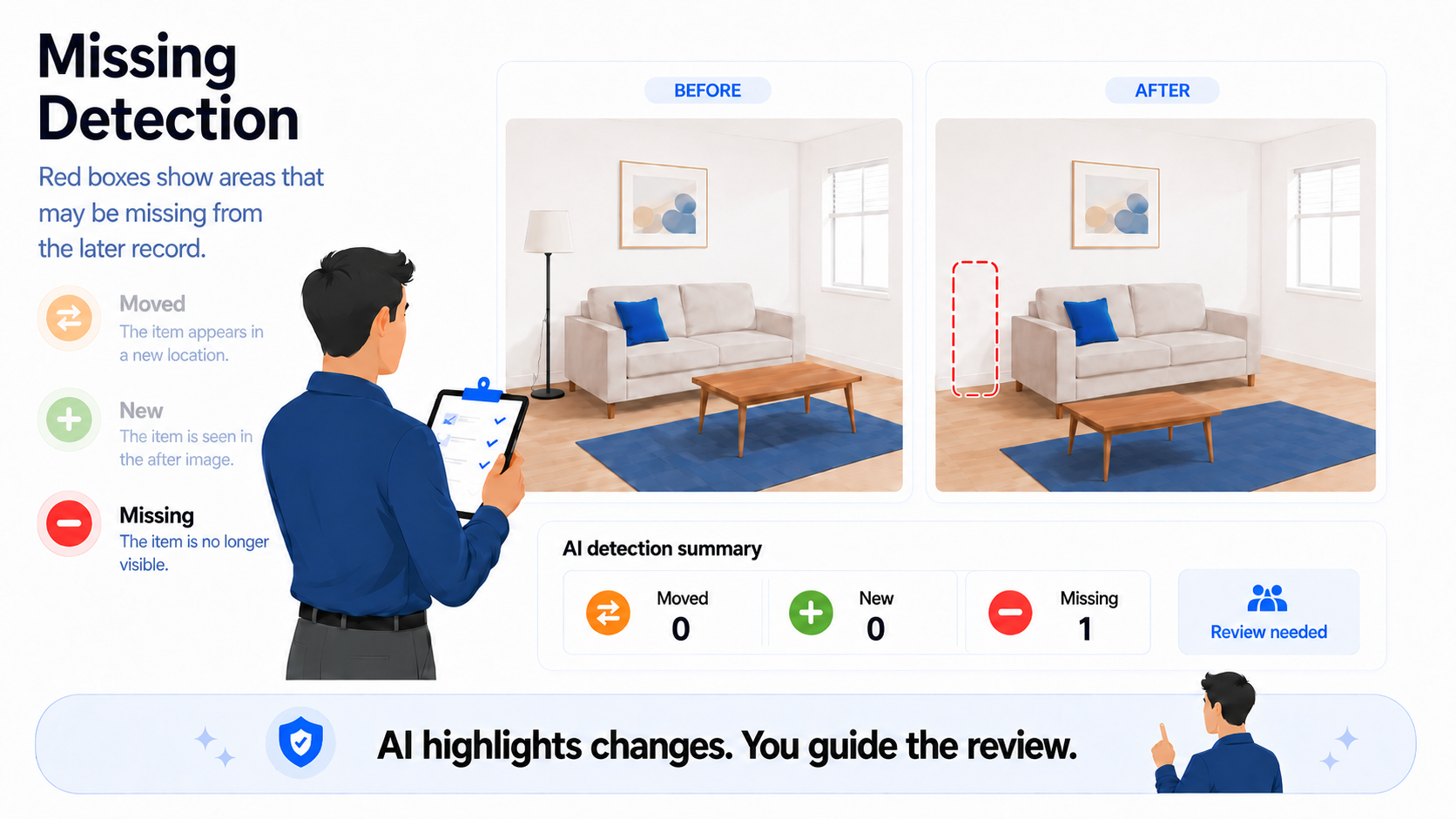
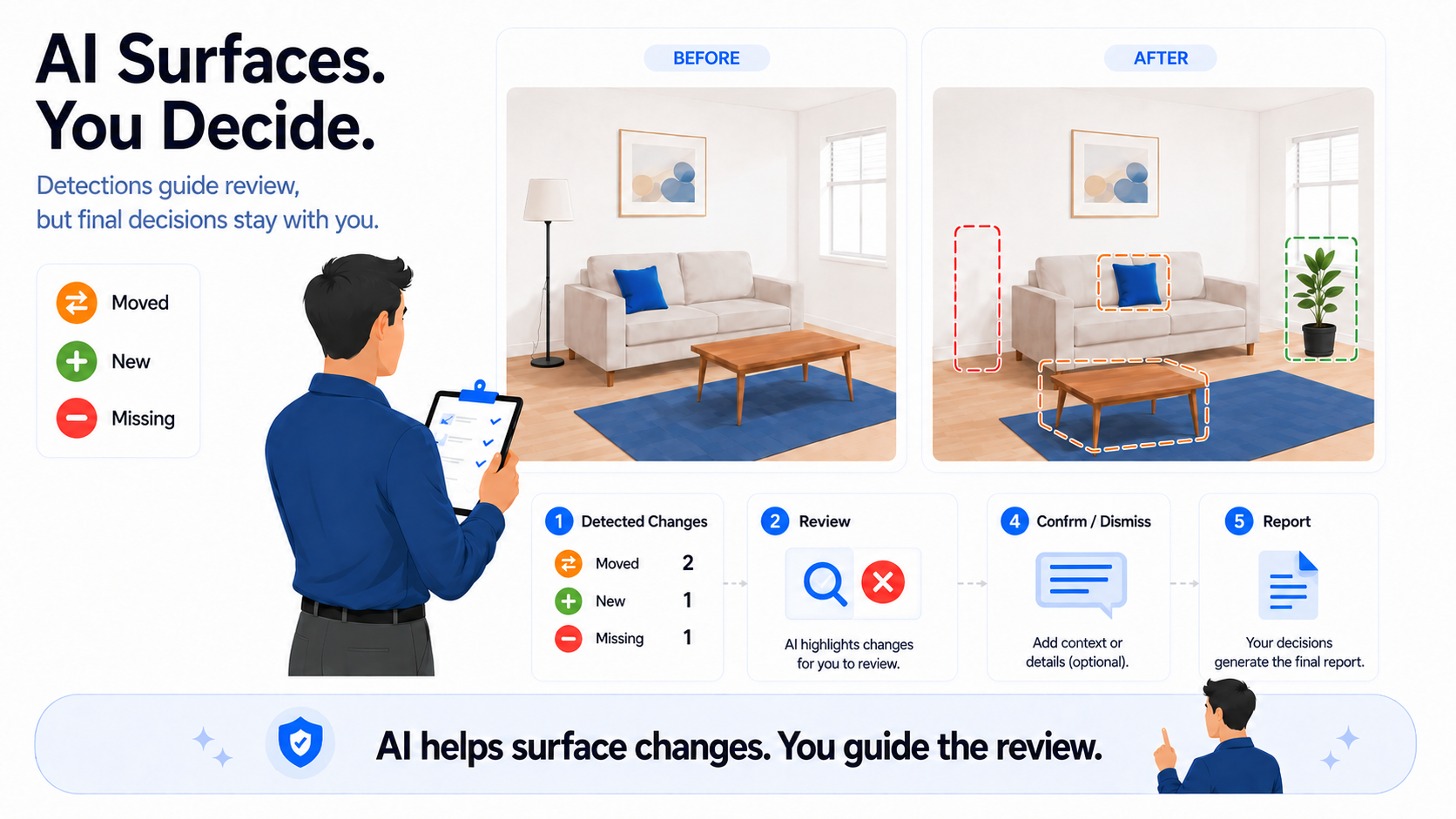
PropCheckAI helps users review before-and-after inspection records by surfacing visual change categories. Orange means moved, green means new, and red means missing. The AI highlights possible changes so users can review and decide.
AI-assisted property inspection review should be useful, clear, and honest
It should not pretend to know everything. PropCheckAI is designed around a practical idea: when a move-in record and a later inspection record are compared, AI can help surface visual changes that may need review.
Those changes are organized into simple detection categories: moved, new, and missing.
The goal is not to replace the landlord’s judgment. The goal is to help the user review before-and-after inspection records faster.
PropCheckAI helps point to areas where something may have changed. The user still reviews the result, adds context, confirms or dismisses findings, and decides what belongs in the final report.
Compare the before-and-after recordsSurface moved, new, and missing detectionsReview, confirm, or dismiss findings
Why simple detection categories matter
Rental inspections can create a lot of visual information. A move-in inspection may show every room, wall, floor, fixture, appliance, cabinet, and included item. A move-out or follow-up inspection may capture the same areas again.
That creates a useful record. But it also creates a review problem. Someone has to compare the before-and-after records. When there are many rooms and many images, manual comparison becomes slow.
AI-assisted detections help organize that review. Instead of forcing the user to search through every image with the same level of effort, PropCheckAI can surface categories of visual change so the user knows where to look first.
That is why simple categories matter. A detection does not need to name every object perfectly to be useful.
What PropCheckAI detections are designed to do
PropCheckAI detections are designed to support review. They can help show where something may have moved, where something may appear new, where something may no longer be visible, which frames or rooms may need attention, and where the user may want to confirm, dismiss, or add a note.
The system is meant to help users move from scattered visual comparison to a more organized review workflow. The AI helps surface possible changes. The user decides what those changes mean.
What PropCheckAI detections are not
AI detections should not be treated as automatic conclusions. A detection does not automatically mean damage, tenant responsibility, a charge, or something that must be included in the report.
A detection means: this area may need review. That is the right level of trust. AI can help point the user toward possible visual changes, but the final decision should come from human review.
The three detection categories
PropCheckAI uses three practical detection categories: moved, new, and missing.
Moved
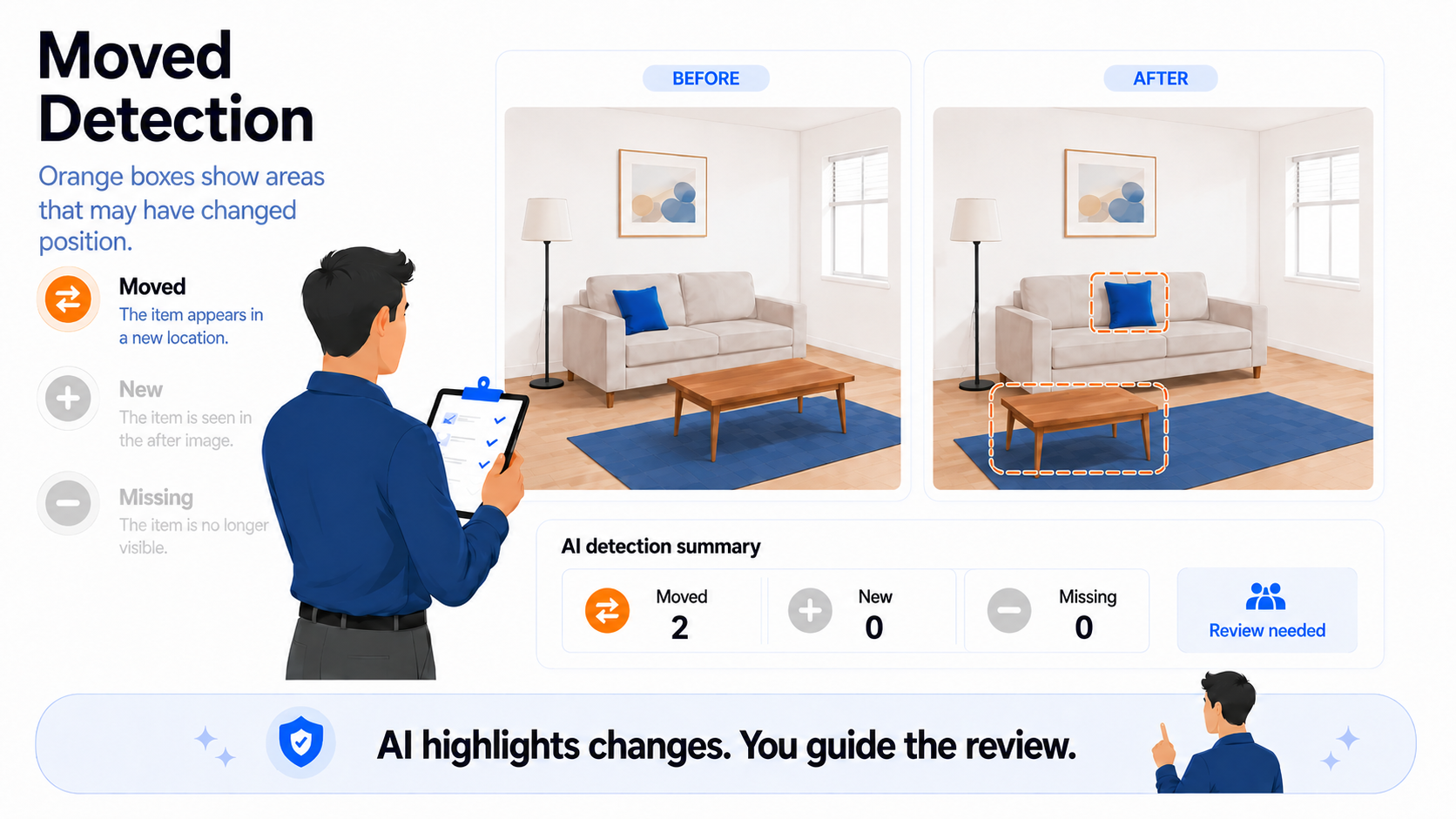
Orange is used for moved detections.
New
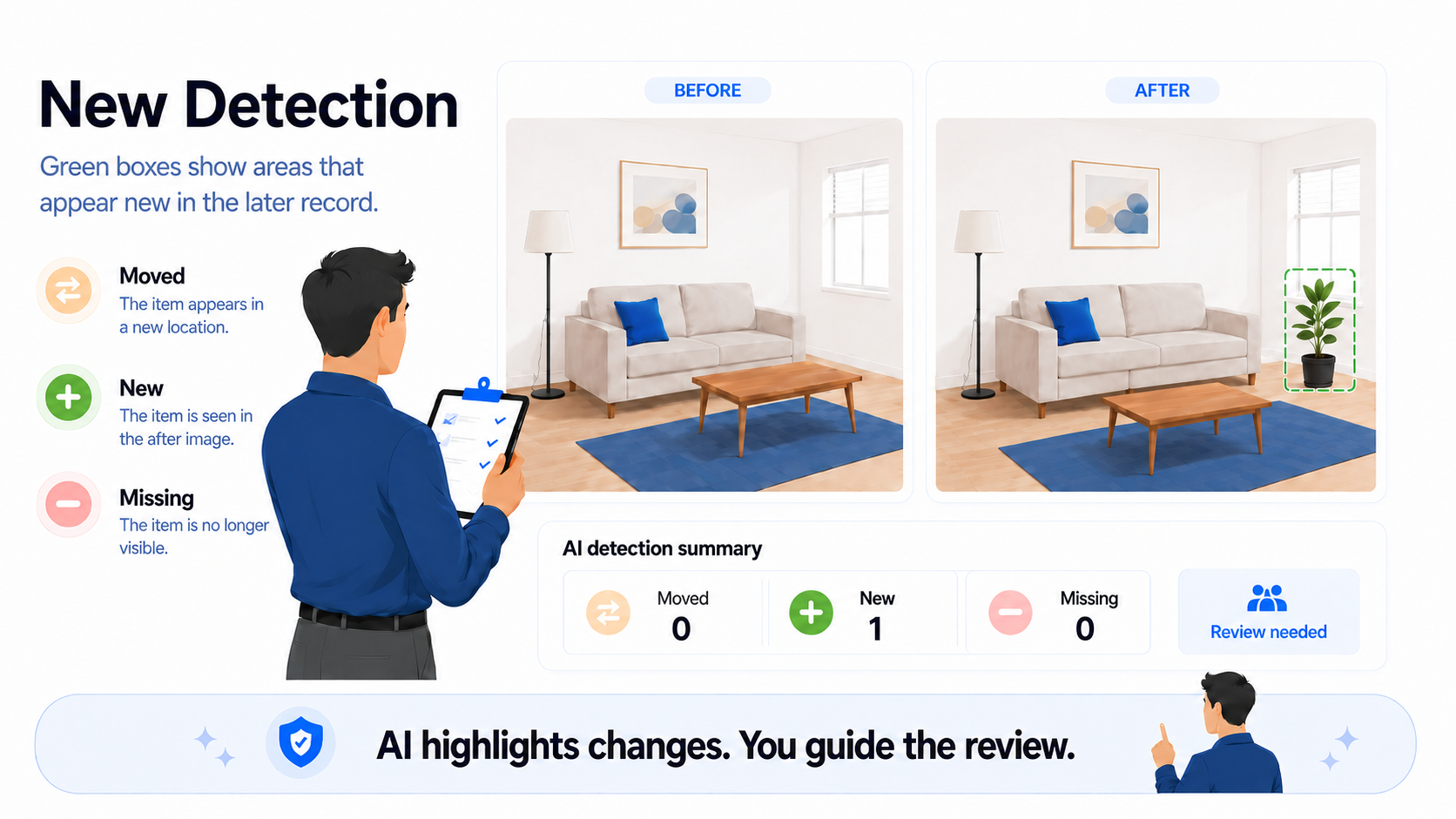
Green is used for new detections.
Missing
Red is used for missing detections.
This color system helps users understand the review faster. Instead of reading a long explanation first, the user can quickly see what kind of change the AI is surfacing.
Moved detections
A moved detection means an area appears to have changed position between the baseline and the later record. In PropCheckAI, moved detections are represented with orange boxes.
A moved detection may appear when something visible in the baseline also appears in the later record, but its location looks different. This can be useful during review because movement can matter in rental inspections.
A moved item may be harmless. It may also need more context. It might have been shifted for cleaning, moved by the renter, or repositioned normally.
How to review moved detections
When reviewing a moved detection, the user should ask simple questions: does the highlighted area actually show movement, is the movement meaningful, could the difference be caused by angle or lighting, is this normal during move-out or cleaning, does it affect the inspection report, and should the finding be confirmed, dismissed, or noted?
A moved detection is not a final decision. It is a review prompt.
New detections
A new detection means an area appears in the later record that was not visible in the baseline. In PropCheckAI, new detections are represented with green boxes.
A new detection may point to something that appears during checkout, staff capture, or after-cleaning documentation. It could be an object, a visible change, a new mark, or an area that simply was not visible in the earlier record.
The key word is appears. A new detection does not automatically mean damage or a claim item. It means the user should review that area.
How to review new detections
When reviewing a new detection, the user should ask whether the highlighted area is actually new, whether it was hidden or outside the frame, whether it is a normal move-out item, whether it is temporary, whether it is a cleaning or repair item, whether it needs a note, and whether it should be included in the report.
A new object visible during checkout may not be important at all. It could be a cleaning bottle, a box, a tool, or something temporarily placed in the room.
Missing detections
A missing detection means something visible in the earlier record may not be visible in the later record. In PropCheckAI, missing detections are represented with red boxes.
Missing detections can be helpful for furnished rentals, included items, fixtures, accessories, or visible room features. But missing detections also need careful review because something may appear missing due to angle, lighting, room layout, or camera position.
A red box means: this area may need review.
How to review missing detections
When reviewing a missing detection, the user should ask whether the item or area was visible in the baseline, whether it is actually missing in the later record, whether it could be outside the frame, whether it is hidden by angle or furniture, whether another image shows it, whether it needs a note, and whether it should be confirmed or dismissed.
Do not assume responsibility from the detection alone. Do not assume the item was removed intentionally.
Why detections are category-based instead of magic object labels
PropCheckAI does not need to pretend the AI knows everything in the room. Rental inspection images are complex. Rooms have different lighting, camera angles, furniture, clutter, reflections, shadows, personal items, cleaning tools, and changing conditions.
Instead of claiming that AI perfectly identifies every object, PropCheckAI uses a more practical approach: surface visual change categories and let the user review them.
The app does not need to say, “This exact object was moved by the renter.” A better system says, “This area appears changed. Please review.”
Why counts help prioritize review
Detection counts can help users understand where review may be needed. A room with many moved, new, or missing detections may deserve more attention than a room with no detections.
Counts do not decide the final result. They help guide the user’s attention. A high detection count does not automatically mean damage. A low detection count does not automatically mean nothing changed.
Why before-and-after structure matters
AI-assisted detection works best when the inspection record is structured. If the move-in record and later record are captured randomly, comparison becomes harder.
A structured workflow helps because rooms are labeled, inspection types are clear, before-and-after records are easier to match, similar capture angles improve comparison, and reports become easier to generate after review.
Detections can need context
A detection may be correct but still not important. A detection may be important but need a note. A detection may be caused by lighting or camera angle. A detection may show a real change but not damage.
For example, a moved item may have been shifted for cleaning. A new item may be a temporary cleaning supply. A missing item may be outside the camera frame. This is why detections need context.
Human review turns detections into findings
A detection becomes useful when the user reviews it. During review, the user can decide whether to confirm the detection, dismiss the detection, add a short note, request another image, include the finding in a report, or leave it out of the report.
The report should reflect human decisions. AI-assisted detections can help start the review, but the report should include reviewed findings.
Confirm, dismiss, or add notes
The best AI review workflow gives users simple choices.
Confirm
Confirm means the user agrees that the detection is meaningful and may belong in the inspection record or report.
Dismiss
Dismiss means the user decides the detection is not important, not accurate, or not relevant for the report.
Add note
Add note means the user wants to add context with a short factual explanation.
Reports should include reviewed findings
The final report should not be a dump of every possible visual difference. It should be a clearer record of what the user reviewed and decided to include.
A better reporting flow looks like this: compare before-and-after records, surface moved, new, and missing detections, review the highlighted areas, confirm or dismiss detections, add short notes where needed, and generate an organized report.
What users should remember
Moved, new, and missing detections are review helpers. They help the user find areas that may deserve attention. They do not replace judgment, decide responsibility, calculate charges, or guarantee outcomes.
That is the right balance: AI helps save time, and humans decide what matters.
Final takeaway
Moved, new, and missing detections help make rental inspection review easier to understand. Orange boxes show areas that may have moved. Green boxes show areas that may be new. Red boxes show areas that may be missing.
These detections help guide the review, but they do not make final decisions. PropCheckAI helps surface visual changes. The user reviews, confirms, dismisses, adds notes, and decides what belongs in the report.
Important Disclaimer
PropCheckAI helps users create, organize, compare, and review rental inspection documentation. PropCheckAI does not provide legal advice, does not guarantee dispute outcomes, and does not make legal or financial decisions for users. Users remain responsible for reviewing inspection results and deciding how reports are used.
Ready to review property changes more clearly?
PropCheckAI helps landlords compare before-and-after inspection records, review moved, new, and missing detections, add notes, and generate organized inspection reports.